Mega Menu Is Not Showing
Watch This Video
Introduction
Follow these steps if your Mega Menu is not showing.
Confirm assignment (Divi 5)
- Edit the mega menu and confirm WordPress menu and Menu item are set, or open Appearance → Menus and confirm the item’s Mega Menu dropdown.
- Confirm Custom Identifier is unique and uses only letters, numbers, and underscores.
- Confirm Navigational Header in Settings matches your header.
On Divi 4, confirm the identifier is added as a CSS class on the parent menu item. See Assigning a Mega Menu.
Step 1: Add The Divi Action Code
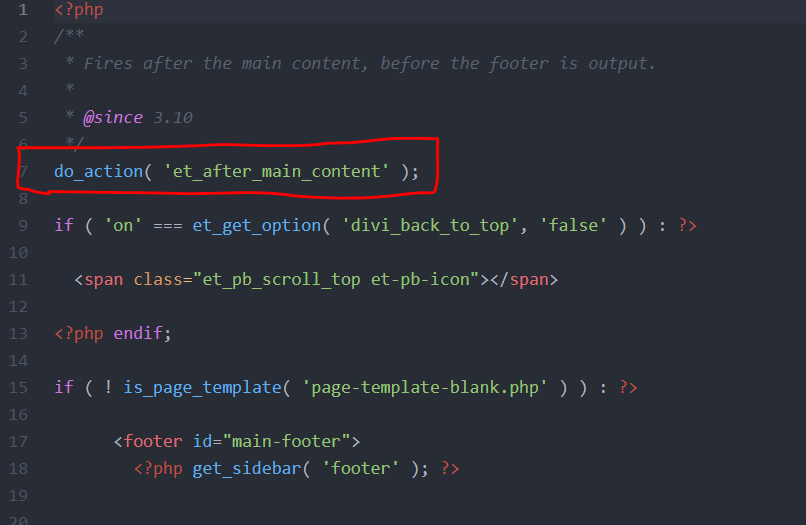
The first reason why your Mega Menu is not showing could be that the Divi action code is missing from your child theme. This is because some child theme developers leave out the Divi action code in the footer.php file. To add this code, make your way to the child theme folder of your child theme and look for the footer.php file. Open this file in a text editor and add the Divi action code under the opening php tag.
do_action( 'et_after_main_content');
Here is a screenshot of how this should look
Step 2: Set Webpages To Default Template
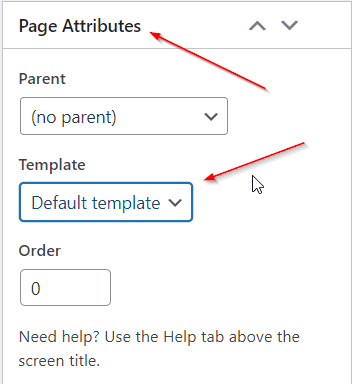
The second reason why your Mega Menu is not showing could be that the webpages of your Divi website are set to Blank Page. To fix this, please make your way to the pages of your website and ensure each page is set to the Default Template option found in the Page Attributes section.