Divi Mega Menu: Translating with WPML
Creating a multilingual website enhances its accessibility and reach. If you're using Divi Mega Menu on a site that requires multiple languages, integrating with WPML (WordPress Multilingual Plugin) allows you to translate your Mega Menu effectively. A crucial part of this process is ensuring each language version of your menu has a unique identifier. Here's how to translate your Mega Menu using WPML:
Divi 5
On Divi 5 you can assign a language-specific mega menu from Appearance → Menus (Mega Menu dropdown) or from the mega menu WordPress menu / Menu item pickers. Each language still needs its own mega menu and a unique Custom Identifier.
Step 1: Translate Menu
- Create Language-specific Menus: Navigate to Appearance > Menus in your WordPress dashboard. Ensure you have a separate menu created for each language your site supports.
- Unique Mega Menu Identifiers: For each language-specific menu, assign a different mega menu (Divi 5 dropdown) or set a different CSS class identifier (Divi 4). This is vital for WPML to recognize and apply the correct translations.
Step 2: Add a New Mega Menu
- Switch to the Desired Language: While adding a new Mega Menu, ensure you're operating in the admin area set to the language you're currently working on. If your site's default language is English and you're adding a French version, switch your admin language to French.
- View All Mega Menus: It's normal to see all your Mega Menus listed, regardless of language. This includes both your original (e.g., English) and the new language (e.g., French) versions.

Step 3: Duplicate or Add New Content
- Duplicate or Create Content: You can either duplicate the content from an existing Mega Menu or add new modules for the translation. This flexibility allows you to maintain consistency across languages or tailor the content to better suit each language's audience.
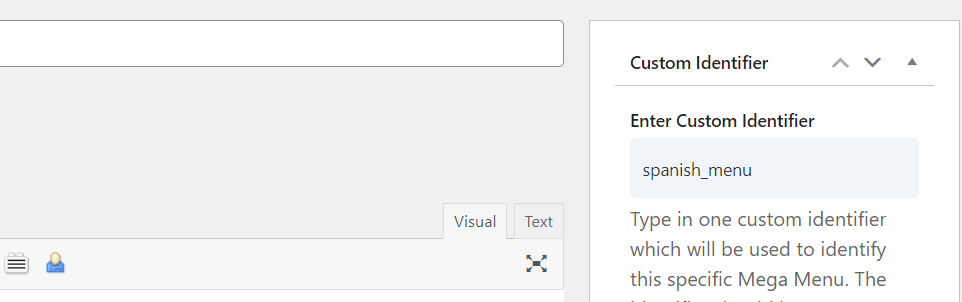
- Update Custom Identifier: Give the translated mega menu its own Custom Identifier. On Divi 5, assign that mega menu to the matching language menu item. On Divi 4, the identifier must match the CSS class on that language’s menu item.
Additional Information
- Different Identifiers for Each Language: The cornerstone of using WPML with Divi Mega Menu is to have distinct identifiers for each language's menu. This ensures seamless integration and correct menu display across languages.
- WPML Configuration: Ensure WPML is correctly configured on your site to manage translations efficiently. This includes setting up language options and translation management within the WPML settings.
- Testing: After setting up your translated Mega Menus, thoroughly test your site in each language to ensure menus display correctly and that the correct translations are applied.