Import Export Settings
What it does
Export your Divi Nitro configuration and import it on another site (or restore a backup). The file is a CSV of the divi-nitro_options settings used by the Nitro Settings hub.
Minify queues live in a separate option (nitro_options) and are not included. Re-apply minify queues on the destination site if you use them.
Where to find it
Divi Engine → Nitro Settings → Import / Export
This section has its own export/import actions (no shared Save footer).
Settings
| Setting | Type | Default | What it does |
|---|---|---|---|
| Export | Button | — | Downloads divi-nitro-settings-YYYY-MM-DD.csv |
| Import | File + button | — | Replaces saved Nitro settings on this site with the selected CSV |
Export
- Open Import / Export.
- Download the export file.
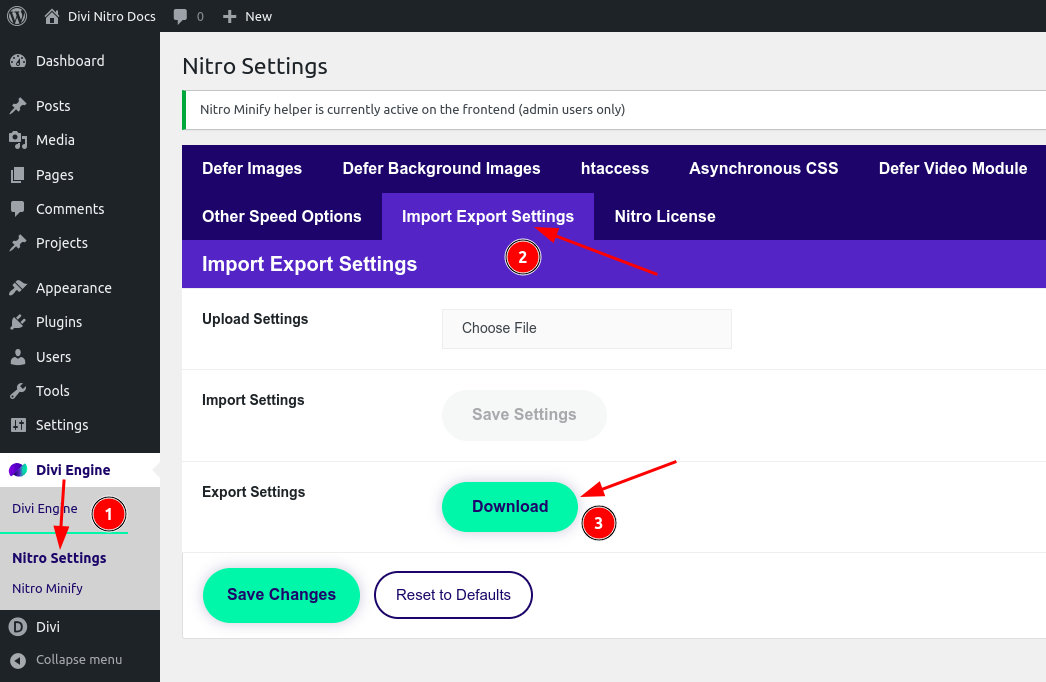 3. Store it somewhere safe before major changes or migrations.
Import
- Choose your previously exported file.
- Confirm that you want to replace this site’s Nitro settings.
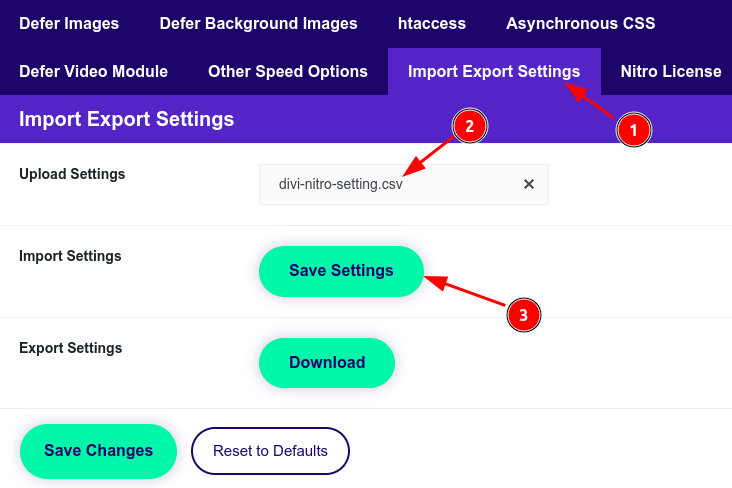 3. Clear minify and Page Cache, then test the front end.
tip
After import, open Performance Insights and confirm competing-cache warnings still match the new environment.