Installation
Use this page to download Divi Machine from your account, install it in WordPress, and activate your license.
Prerequisites
- WordPress administrator access on a staging or production site.
- Latest WordPress.
- Latest Divi.
- The Divi Machine ZIP from your Divi Engine account downloads.
- A custom fields plugin (one of):
Optional prerequisites
- Divi Machine Accounts if you use member-facing features that depend on it.
Possible conflicts
warning
Divi Machine includes the Divi Ajax Filter codebase. If Divi Ajax Filter is already installed as a separate plugin, deactivate it before running Divi Machine. Running both can cause conflicts.
Download Divi Machine
- Sign in to your Divi Engine account.
- Open Downloads.
- Download the Divi Machine package (ZIP).
Upload and activate
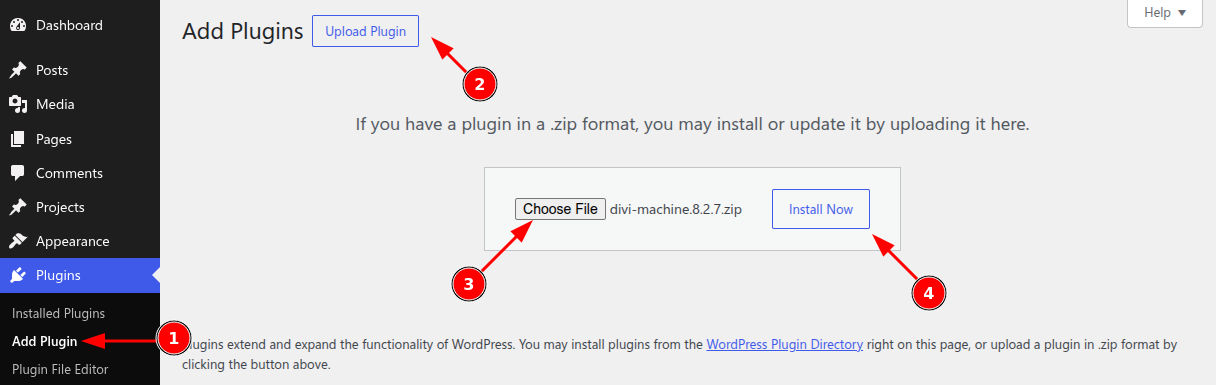
- In the WordPress dashboard, go to Plugins → Add New Plugin.
- Click Upload Plugin.
- Choose the Divi Machine ZIP file, then click Install Now.
- When installation finishes, click Activate Plugin.
Confirm activation
- Confirm Divi Machine appears under Plugins → Installed Plugins as active.
- Open the Divi Builder on a test page and verify Divi Machine modules are available in the module picker (for example Archive Loop or ACF Item).
Activate the license
- Sign in to your Divi Engine account.
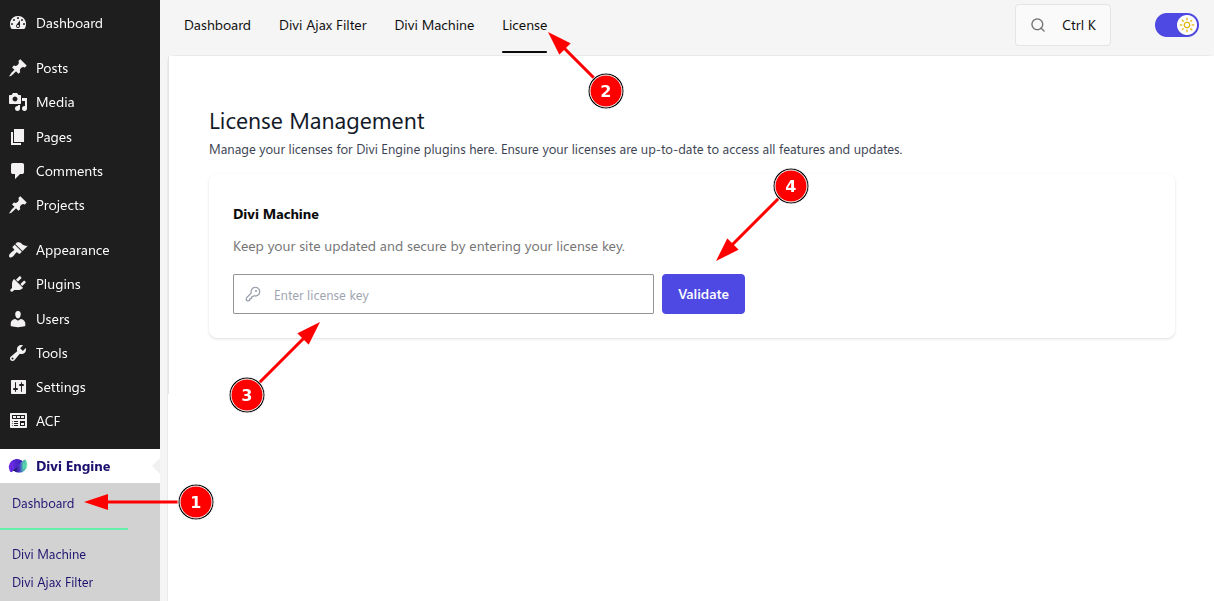
- Open Orders, choose Manage license for Divi Machine, and generate or copy your license key.
- On your site, open Divi Engine → License (or follow the admin notice), paste the key, and Activate.
Troubleshooting
- Upload failed: Keep the file as a real
.zip(not unzipped), and confirm your host allows uploads underwp-content/plugins/. - License will not activate: Remove extra spaces from the key and confirm the subscription is active in your Divi Engine account.
- White screen or fatal errors after activation: Temporarily switch to a default theme, confirm PHP meets Divi’s requirements, and retry with other plugins disabled to find a conflict.
Keep the plugin updated
- Prefer automatic updates from Plugins → Installed Plugins when available.
- For manual updates, download the latest ZIP from your account and use Upload Plugin to replace the existing version.
- Test major updates on staging before production.
What's next
- Welcome to Divi Engine & Divi Machine — Intro video and site preparation tips.