Divi 5 Migration Tool
Divi Machine’s Divi 5 Migration Tool unifies older Divi Machine / shop-loop shortcode slugs in your database so Divi’s own Divi 5 migrator can convert layouts cleanly. It does not replace Divi’s migrator.
Back up your database before you run this tool. The shortcode replacement cannot be undone.
When to use this tool
Use it if the site still has Divi 4 layouts that include Machine Loop, Machine title/thumbnail shortcodes, or older shop-loop variants.
If you are building a new Divi 5 site, skip this guide and start from Installation instead.
Recommended order
- Back up the database (and files if you prefer a full restore point).
- Run Divi Machine → Tools → Divi 5 Migration Tool (Start Migration) before upgrading to Divi 5 when possible.
- Update to Divi 5.
- Run Divi’s Divi 5 migrator.
- Re-save any Divi Library custom loop layouts called out in the Machine admin notice.
- Spot-check archives, singles, and search results on the front end.
Open the Machine migration tool
- Go to Divi Engine → Divi Machine.
- Open Tools → Divi 5 Migration Tool.
- Read the on-screen warnings.
- Click Start Migration.
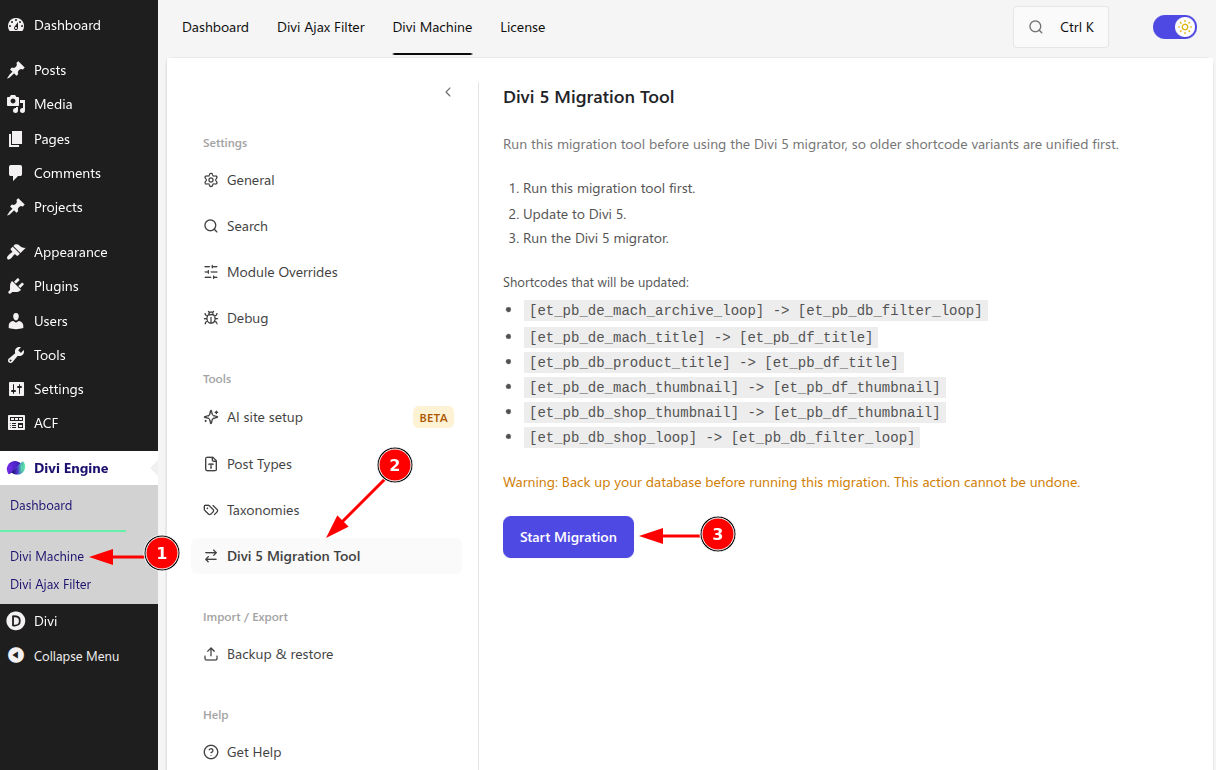
On success you should see a count of updated posts and meta rows (for example: migration completed with N posts and M meta rows).
You need the manage_options capability to run the tool.
What Machine’s tool does vs Divi’s migrator
| Divi Machine Migration Tool | Divi’s Divi 5 migrator | |
|---|---|---|
| Purpose | Replace legacy shortcode slugs in post content and post meta (including serialized data) | Convert Divi 4 module markup to Divi 5 |
| When | Preferably before Divi 5 | After Divi 5 is active |
| Reversible | No — restore from backup | Follow Divi’s own process |
Shortcode mapping
Machine’s tool rewrites these slugs (among related shop variants):
| From (legacy) | To (unified) |
|---|---|
et_pb_de_mach_archive_loop (Machine Loop) | et_pb_db_filter_loop (Archive Loop) |
et_pb_db_shop_loop | et_pb_db_filter_loop |
et_pb_de_mach_title | et_pb_df_title |
et_pb_db_product_title | et_pb_df_title |
et_pb_de_mach_thumbnail | et_pb_df_thumbnail |
et_pb_db_shop_thumbnail | et_pb_df_thumbnail |
After migration on Divi 5, use the Archive Loop module for results grids. Configure Archive Loop settings in that reference (bundled Ajax Filter)—this page covers the migration workflow only.
Re-save Divi Library loop layouts
After Divi 5 is active, Machine may show an admin notice listing Divi Library layouts used as custom loop layouts that are still stored in Divi 4 format and contain modules (such as Category Loop or Repeater) that can appear as raw shortcode until each layout is opened and saved again.
- Open the notice’s Open Divi Library link (or go to Divi → Divi Library).
- Edit each listed layout in the Visual Builder.
- Save the layout (no content change required beyond a successful save).
- Dismiss the notice when finished.
Risky shortcodes the notice watches for include Category Loop, legacy Machine Loop / Archive Loop shortcodes, and Repeater inside library layouts.
Verify
On the front end, confirm:
- Archive and taxonomy templates show the loop (not blank cells or raw shortcode text)
- Custom loop cards still show Custom Field Item / meta / thumbnails
- Search results and filtered pages still load the correct post type
Troubleshooting
| Symptom | What to try |
|---|---|
| Blank Archive Loop after migrate | Confirm post type is still selected on the loop; re-save the page and any linked Divi Library loop layout. See Archive Loop. |
| Raw shortcode text on the page | Run Machine’s tool if you skipped it; re-save the Theme Builder / Library layout that contains the shortcode. |
| Missing posts / wrong CPT | Check Divi Machine → Post Types and permalinks; flush permalinks under Settings → Permalinks. |
| Nested Category Loop / Repeater looks unstyled | Re-save the Divi Library layout listed in the admin notice. |
Machine can still render some unmigrated Divi 4 loop shortcodes on Divi 5 as a compatibility path, but you should finish migration and re-save layouts rather than relying on that forever.
What's Next
- Archive Loop (Divi 5) — Configure the results loop after migration
- Module overview — Divi 5 Machine module map
- Custom loop layouts — Loop card patterns
- Migration and compatibility — Section index