Add/Edit Post Types
Register custom post types from the Divi Machine React settings hub under Tools → Post Types. Machine stores each definition and registers the public post type from those settings.
Open Post Types
- Go to Divi Engine → Divi Machine.
- Open Tools → Post Types.
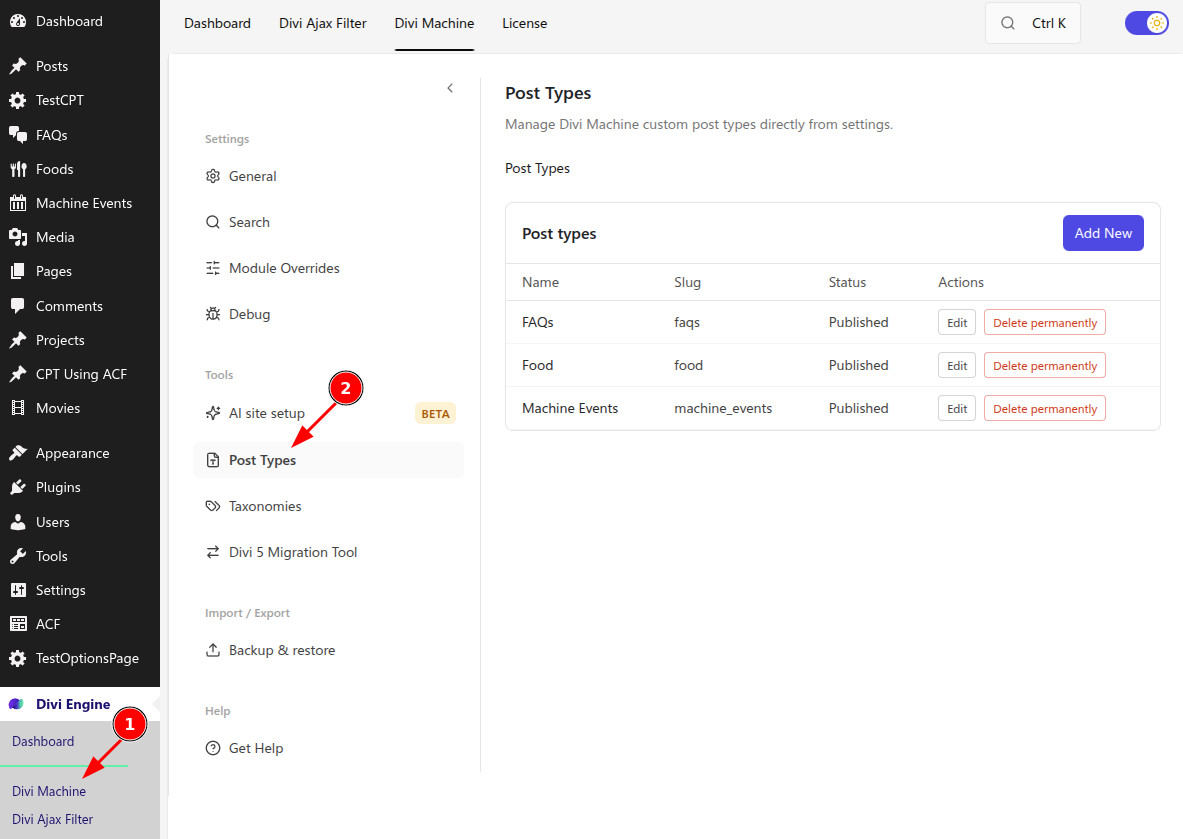
List view
The list shows your Machine-managed post types:
| Column | Meaning |
|---|---|
| Name | Display title |
| Slug | Post type key / rewrite slug |
| Status | Published (active) or Draft |
| Actions | Edit or Delete permanently |
Click Add New to create a post type, or Edit on a row to change one.
warning
Do not use WordPress reserved terms for post type slugs or names.
Add or edit a post type
- Click Add New, or Edit on an existing row.
- Enter a Post type name (for example
Projects). On blur when creating, Machine autofills the slug and labels from the name. - Adjust Slug if needed (alphanumeric and Latin characters; use underscores instead of spaces).
- Set Status to Draft or Publish.
- Configure the General, Labels, and Visibility & Advanced tabs.
- Click Create Post Type or Update Post Type, then use Back to list when finished.
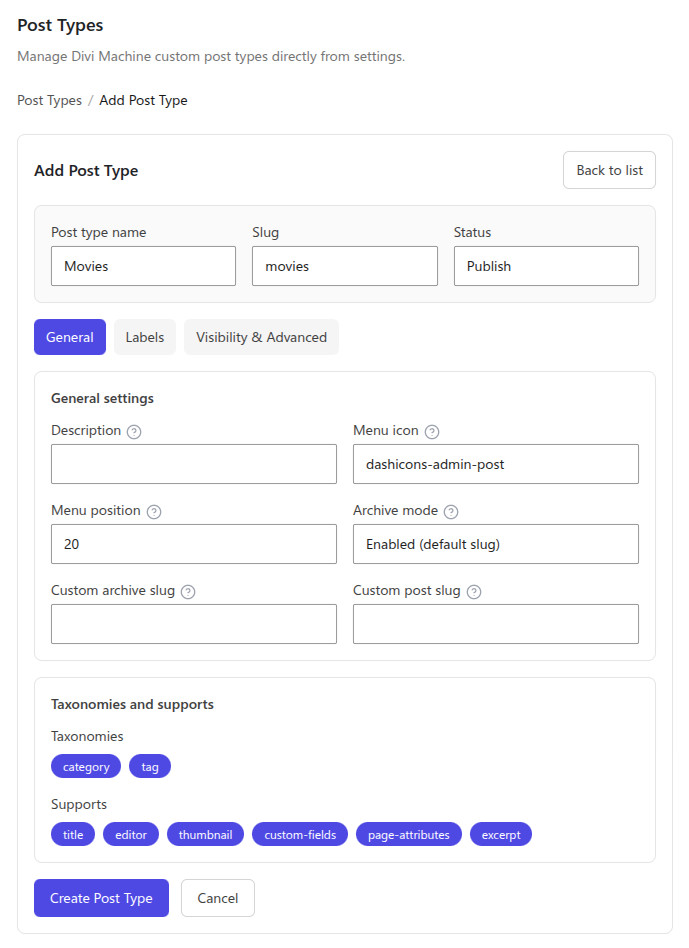
Publish registers the post type for use on the site. Draft keeps the definition without activating it as a live public post type.
Settings reference
Top fields
| Setting | Notes |
|---|---|
| Post type name | Unique display name; drives autofill when creating |
| Slug | Post type key; keep unique and avoid reserved terms |
| Status | Draft or Publish |
General
| Setting | Notes |
|---|---|
| Description | Optional short summary of the post type |
| Menu icon | Dashicon name (for example from the Dashicons library) |
| Menu position | Sidebar order; lower numbers appear higher |
| Archive mode | Enabled (default slug), Enabled (custom archive slug), or Disabled |
| Custom archive slug | Used when archive mode is custom |
| Custom post slug | Optional single-post URL slug; leave blank for the default |
| Taxonomies | Toggle built-in category and tag for this post type |
| Supports | title, editor, thumbnail, custom-fields, page-attributes, excerpt |
Labels
Specify admin and UI labels for the post type:
| Setting | Example use |
|---|---|
| Singular label | Product, Event |
| Plural label | Products, Events |
| Menu name | Admin menu item |
| Admin bar name | Admin bar when editing |
| All items | List table “All items” |
| Add new item / Add new / New item | Create flows |
| Edit item / Update item | Edit flows |
| View item / View items | View links |
| Search item | Search box label |
Visibility & Advanced
| Setting | Notes |
|---|---|
| Public | Show the post type in the admin UI |
| Publicly queryable | Allow single and archive endpoints |
| Show in admin sidebar | Admin menu entry |
| Show in admin bar | Admin bar presence |
| Show in nav menus | Available in Appearance → Menus |
| Enable Gutenberg / REST | Block editor and REST API support |
| Prettify post permalink | Prefer post-type/category/single style URLs; does not work with hierarchical categories |
| Exclude from search | Keep posts of this type out of search results |
| Hierarchical | Allow parent/child posts (like pages) |
| Enable rewrite | Use WordPress rewrites for this type |
| Rewrite with front | Prepend the permalink front base (for example /blog/) |
Delete a post type
On the list, click Delete permanently and confirm. This removes the Machine definition and cannot be undone.
What's Next
- Add/Edit Taxonomies — Attach taxonomies to your post types
- AI site setup — Generate CPTs from a brief (Beta)
- Divi Machine Settings — Search, debug, and backup options
- Category Loop — List terms on the front end