Add/Edit Taxonomies
Register custom taxonomies from the Divi Machine React settings hub under Tools → Taxonomies, then attach each taxonomy to a post type for filtering and archives.
Open Taxonomies
- Go to Divi Engine → Divi Machine.
- Open Tools → Taxonomies.
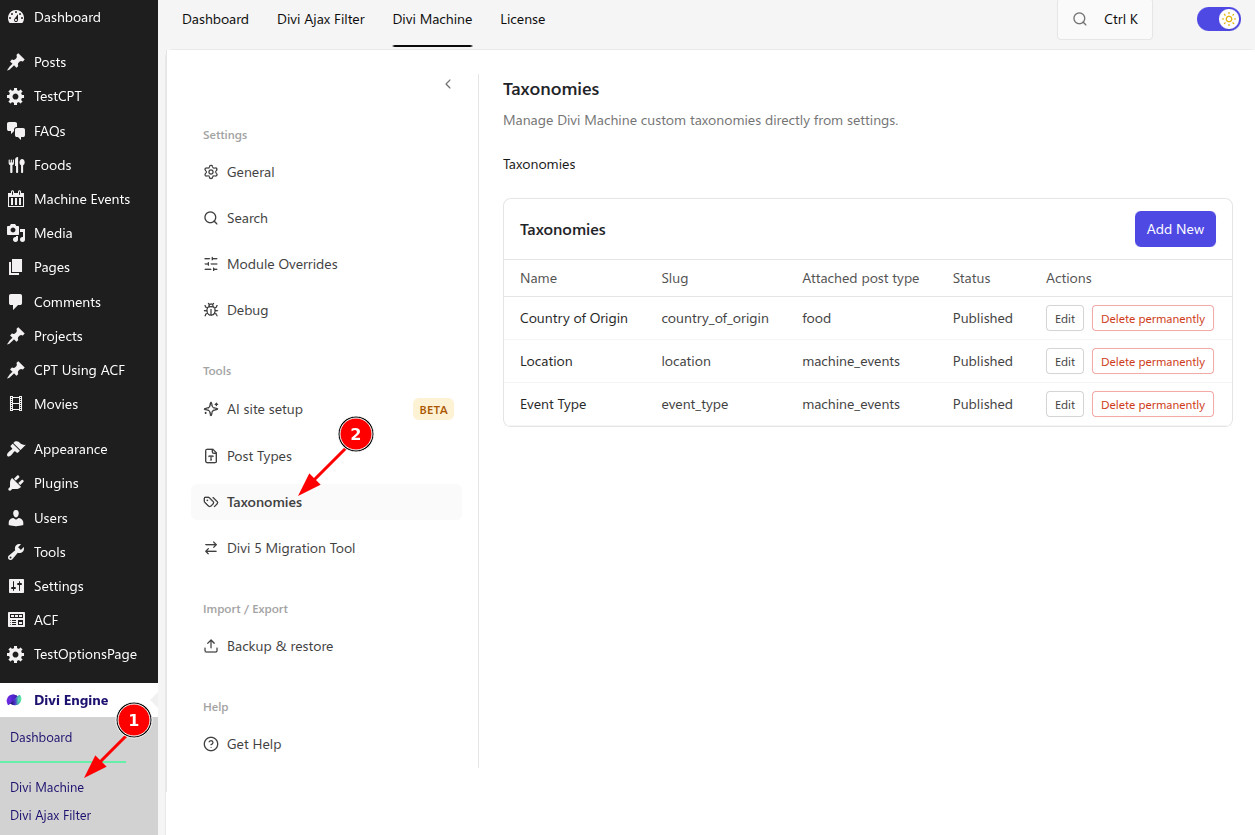
List view
| Column | Meaning |
|---|---|
| Name | Display title |
| Slug | Taxonomy key / rewrite slug |
| Attached post type | Post type this taxonomy is linked to |
| Status | Published (active) or Draft |
| Actions | Edit or Delete permanently |
Click Add New to create a taxonomy, or Edit on a row to change one.
warning
Do not use WordPress reserved terms for taxonomy slugs or names.
note
Create at least one post type first if you need to attach a taxonomy to a Machine CPT. You can also attach to built-in types such as posts or pages when they appear in the list.
Add or edit a taxonomy
- Click Add New, or Edit on an existing row.
- Enter a Taxonomy name. On blur when creating, Machine autofills the slug and labels from the name.
- Adjust Slug if needed (alphanumeric and Latin characters; use underscores instead of spaces).
- Set Status to Draft or Publish.
- On General, choose Attach to post type (required before save).
- Configure Labels and Visibility & Advanced as needed.
- Click Create Taxonomy or Update Taxonomy, then use Back to list when finished.
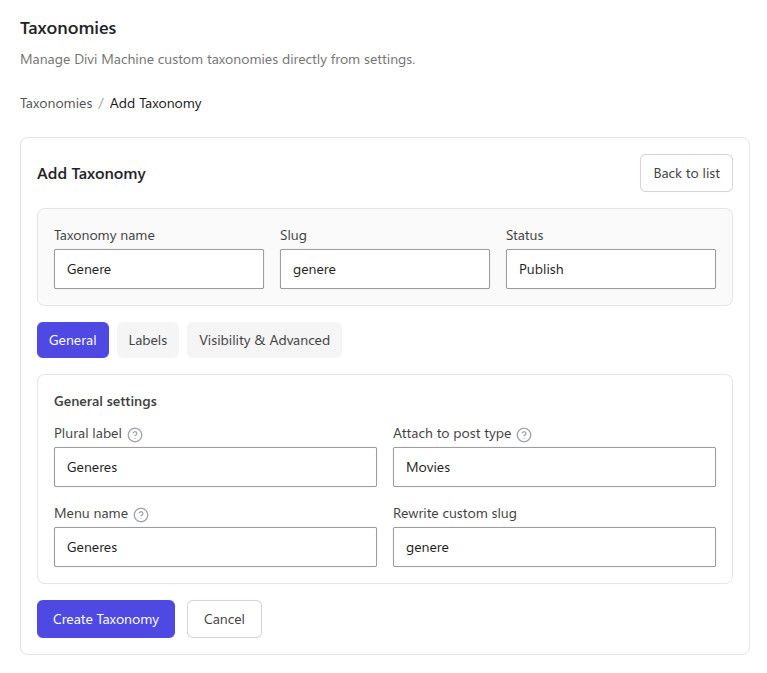
Publish registers the taxonomy for use. Draft keeps the definition without activating it.
Settings reference
Top fields
| Setting | Notes |
|---|---|
| Taxonomy name | Display name; drives autofill when creating |
| Slug | Taxonomy key; keep unique and avoid reserved terms |
| Status | Draft or Publish |
General
| Setting | Notes |
|---|---|
| Plural label | Used for the taxonomy admin menu item |
| Attach to post type | Required. Post or custom post type this taxonomy belongs to |
| Menu name | Label in the admin menu |
| Rewrite custom slug | Custom rewrite slug for term URLs |
Labels
Define singular/plural and admin UI strings, including:
| Setting | Notes |
|---|---|
| Singular label / Plural label | Core naming |
| Menu name | Admin menu |
| All items / Edit item / View item / Update item | List and edit flows |
| Add new / New item | Create flows |
| Parent item / Parent item colon | Hierarchical parent labels |
| Search items / Popular items / Most used | Discovery UI |
| Separate with commas / Add or remove items | Non-hierarchical term UI |
| Not found / No terms | Empty states |
| Item list navigation / Item list | List navigation labels |
Visibility & Advanced
| Setting | Notes |
|---|---|
| Public | Intended for public admin or front-end use |
| Publicly queryable | Allow public queries for this taxonomy |
| Hierarchical | Parent/child terms (like categories) |
| Show UI | Default admin UI for managing terms |
| Show in menu | Show under the attached post type menu |
| Show in nav menu | Available in Appearance → Menus |
| Show in admin column | Column on the attached post type list screen |
| Enable rewrite | Use URL rewrites for this taxonomy |
| Rewrite with front | Prepend the permalink front base |
| Rewrite hierarchical | Allow hierarchical term URLs |
Delete a taxonomy
On the list, click Delete permanently and confirm. This removes the Machine definition and cannot be undone.
What's Next
- Add/Edit Post Types — Create or edit the attached post types
- Category Loop — Display terms on the front end
- AI site setup — Generate taxonomies from a brief (Beta)
- Divi Machine Settings — Search, debug, and backup options