User Item
This reference is for Divi 5. The same module exists in the Classic Builder. See User Item on Divi 4.
Purpose and when to use
User Item (divi-membership/user-item) shows one piece of user data. Its Divi 5 module picker label is User Item. Put it inside a custom loop layout used by User List, or on a normal page to show the logged-in member (for example a greeting).
Add it from the Divi Membership folder in the Visual Builder.
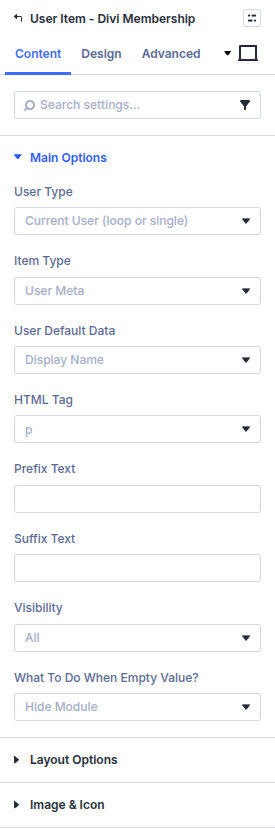
Inside a User List layout, set User Type to Current User (loop or single). On a normal page, Logged In User reads the person who is signed in, and Author of the Post reads the post author.
Before you configure this module
- For a directory, the parent is a User List Custom Loop Layout.
- For a membership badge, the plan has a badge name on its Options tab. See Adding a membership plan.
Quick setup
- Add User Item.
- Set User Type.
- Set Item Type. User Meta is the default and shows Display Name.
- Add Prefix Text or Suffix Text if you need a label such as “Hello,”.
- Choose what happens when the value is empty. The default is Hide Module.
Content tab
| Group | What it configures |
|---|---|
| Main Options | Which user, which field, HTML tag, prefix, suffix, visibility, empty value |
| Layout Options | Inline layout and word limit |
| Image & Icon | Icon or image beside the value |
| Background / Link / Admin Label | Standard Divi groups |
Item types
| Item Type | Extra settings |
|---|---|
| User Meta | User Default Data: Display Name, Email, Website, User Registered Date, User Role, Avatar, Biographical Info. Avatar adds Avatar Size (default 32) |
| Profile Link | Profile Link Endpoint (Members Page or Authors Page) and Profile Link Text (default View Profile) |
| ACF Field | ACF Field Name |
| Membership Plan | Membership Title or Membership Badge |
| Custom Meta | Custom Field Name (user meta key) |
HTML Tag defaults to p. Visibility defaults to All. Logged in users only hides the value from guests.
What to do when empty value? can hide the module, the parent row, the parent section, another element (CSS selector), or show Custom Text.
Layout
Make inline? defaults to off. Enable Max Word Count defaults to off. When it is on, you can set the word count, an ending (text or read more), and the ending text.
Design tab
| Group | What it configures |
|---|---|
| Typography | Item and Value. Prefix and Suffix when those fields have text. Read More Text. Profile Link Text when the item is a profile link |
| Button | Profile link button styles when the item is a profile link |
| Icon Settings | Shown when Use Icon is on |
| User Item Padding | Padding around the value |
| Sizing, spacing, border, box shadow, filters, animation, transform | Module chrome |
Advanced
Standard Divi groups: attributes, CSS, conditions, visibility, transition, position, and scroll.