Divi Protect
This reference is for Divi 5. The same module exists in the Classic Builder. See Divi Protect on Divi 4.
Purpose and when to use
Divi Protect shows one Protect Section on the page. Its Visual Builder label is Divi Protect. Add it from the Divi Protect folder.
The module does not store the password. Create the section, password, and shortcode under Divi Engine → Protect Sections, then select that section here.
Until a section is selected, the builder shows Select a Protect Section. If the section has no layout yet, open it with the Divi Editor and add modules.
Before you configure this module
- Divi Protect is active.
- The Protect Section is saved, with a password and a layout.
Quick setup
- Add Divi Protect.
- Under Module Options, set Select your Protected Section.
- Open Design if you want to style the title, field, error, or button on this page.
- Save the layout and test the page while logged out.
The password field includes a control to show and hide the password.
Content tab
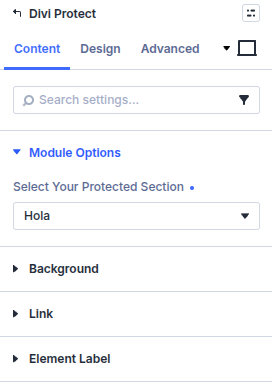
| Group | What it configures |
|---|---|
| Module Options | Which Protect Section this module shows |
| Background / Link / Admin Label | Standard Divi groups |
Core settings
| Setting | Type | Default | Notes |
|---|---|---|---|
| Select your Protected Section | select | — Select — | Published Protect Sections. Choose the section visitors should unlock. |
Design tab
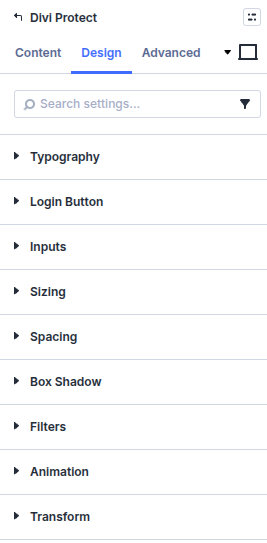
| Group | What it configures |
|---|---|
| Typography | Title, Form Field, and Error Message |
| Login Button | Submit button styles |
| Inputs | Border on the password field |
| Sizing / Spacing / Box Shadow / Filters / Animation / Transform | Standard Divi groups |
Advanced includes attributes, custom CSS, conditions, visibility, transitions, position, and scroll. Custom CSS targets are Title, Form Field, Error Message, and Login Button.
Shortcode
Each Protect Section also has a Unique Shortcode on its Password tab. Add a Code module and enter that name in brackets, for example [members_area], when you want the section without this module.
Form styles from the Protect Section Style tab apply to the shortcode. Module Design styles apply when you use this module.
What's next
- Protect Section settings — Password, cookie, labels, and the Style tab.
- Quick start — Create the section and place this module.