Post Carousel
Post Carousel displays posts in a sliding carousel using a Custom Loop Layout (or related query options). Choose Swiper or Slick as the slider library and tune arrows, dots, autoplay, and slides in view.
Overview
Use Post Carousel for featured listings, related posts, or marketing rows. Prefer Archive Loop when you need filtering and pagination instead of a carousel.
How to use Post Carousel
- Build a custom loop layout in the Divi Library.
- Add Post Carousel to the page.
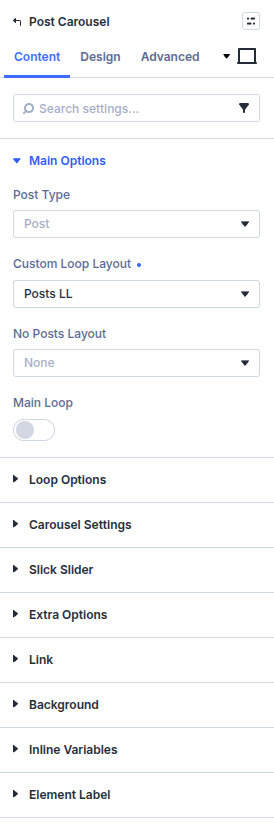
- Set Post Type and Custom Loop Layout under Main Options.
- Configure Loop Options (terms, sorting, related/post object behavior).
- Set Carousel Settings (library, posts in view, arrows, autoplay).
- Style arrows and dots under Design.
Main Options
Post Type
Post type(s) included in the carousel query.
Custom Loop Layout
Divi Library layout rendered for each slide/card.
No Posts Layout
Optional Library layout when the query returns no posts.
Loop Options
Term include/exclude, sorting (including custom field / published date methods), sticky posts, tags type, taxonomy name, and post-object relation methods (specific posts vs related posts). Align related-post taxonomies with your CPT setup.
Carousel Settings
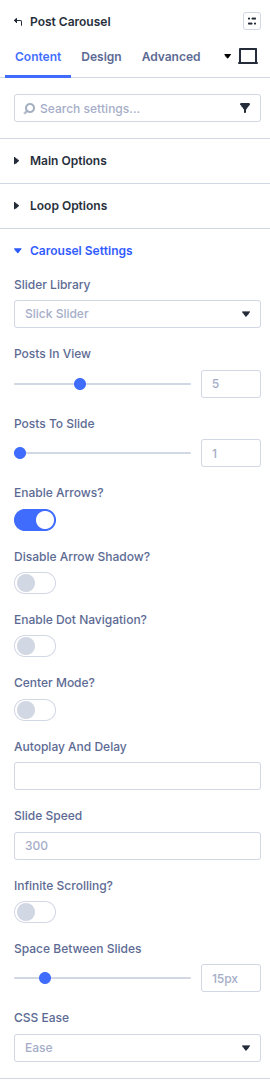
Slider Library
Swiper or Slick—additional option groups appear for the library you select.
Posts in view / Posts to Slide
How many cards are visible and how many advance per navigation action.
Enable Arrows? / Enable Dot Navigation? / Center Mode?
Navigation chrome and center-mode padding.
Autoplay and delay / Slide speed / Infinite scrolling? / Space Between Slides
Motion and spacing controls.
Previous / Next Button (CSS Selector)
Optional external elements that trigger prev/next.
Library-specific groups (Swiper JS, Slick Slider) expose effect, grab cursor, mousewheel, keyboard, scrollbar, fade, adaptive height, RTL, vertical, and related toggles.
Design
- Design → Arrows — Set previous/next icons, colors, sizes, and positions. General and mobile controls are available when arrows are enabled under Content.
- Design → Dots — Set normal and active dot colors and dot size when Enable Dot Navigation is on.
- Design → Default Layout - Title / Excerpt — Set typography for the module's built-in card layout.
When you use a Custom Loop Layout, style the card's title, excerpt, image, and other content inside that Library layout; the carousel module controls only the carousel chrome and wrapper. Standard Divi sizing, spacing, borders, filters, transforms, and animation remain available.
Pitfalls and limits
- Empty carousel usually means wrong post type, empty query filters, or a missing/unpublished loop layout.
- Do not put Archive Loop inside the carousel card layout.
- For deprecated full-page sliders, see Post Slider (deprecated).
What's Next
- Custom loop layouts — Card templates
- Slider / carousel feature — Feature overview
- Archive Loop — Filtered grids instead of carousels
- Module overview — All Machine modules