Repeater / Table / Tabs
Repeater/Table/Tabs has two modes under Repeater Type:
- Custom Field Items — Nest regular Custom Field Item modules (plain ACF fields; ACF Pro is not required) and show them as a grid or list.
- Custom Field Repeater (ACF Pro) — Loop rows of an ACF Pro Repeater field as a table, tabs, accordion, or Divi Library Loop Layout.
Overview
Use Custom Field Items on loop cards and single templates when you want several independent fields side by side (price, location, icon rows). You do not need an ACF Repeater field for this. Step-by-step: Repeat ACF items.
Use Custom Field Repeater (ACF Pro) when one post stores multiple related rows (specs, FAQs, team members). Deeper recipes: ACF Repeater, Repeater table, tabs, accordion.
How to use Custom Field Items (no ACF Pro Repeater)
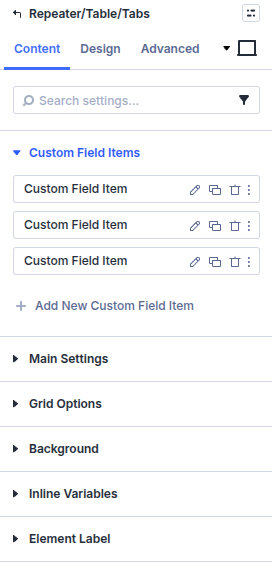
- Add Repeater/Table/Tabs to the layout.
- Set Repeater Type to Custom Field Items.
- Add Custom Field Item children. Each child targets a normal field slug (not a repeater sub-field).
- Set Custom Field Item Repeat Style to Grid or List.
- For Grid, set columns and gutters. For List, set the separator and spacing around it.
How to use Custom Field Repeater (ACF Pro)
- Create an ACF Pro Repeater and assign it to the post type.
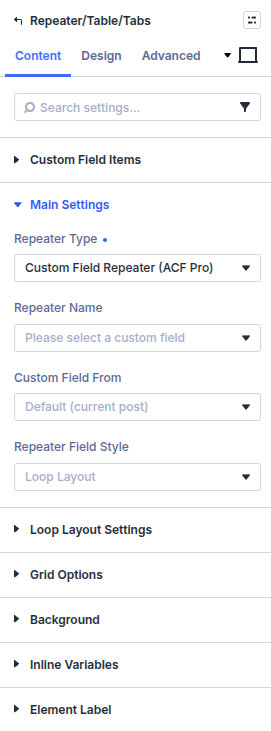
- Add Repeater/Table/Tabs and set Repeater Type to Custom Field Repeater (ACF Pro).
- Set Repeater Name to the repeater field key (or a custom ID).
- Choose Repeater Field Style: Loop Layout, Table (basic fields only), Tabs, or Accordion.
- For Loop Layout, tabs, or accordion, pick a Repeater Loop Layout whose Custom Field Items use sub-field keys. For table, Machine outputs the repeater’s basic sub-fields as columns.
Main settings
Repeater Type
Custom Field Items (default) or Custom Field Repeater (ACF Pro). This choice controls which other groups appear.
Custom Field Items
Custom Field Item Repeat Style
Grid or List. List can use a List Separator and left/right spacing around the separator.
Custom Field Items (children)
Add Add New Custom Field Item. Each child is a normal Custom Field Item pointed at a regular field, not a Pro repeater sub-field.
Grid Options
Shown when Repeat Style is Grid: Grid Columns, tablet/mobile columns, Grid Gap, and Custom Gutter Width.
Custom Field Repeater (ACF Pro)
Repeater Name / Custom repeater field name
Select the repeater field, or choose a custom ID and type the field name/key.
Custom Field From
Where the repeater lives: Default (current post), User Field, or Current Taxonomy.
Repeater Field Style
Loop Layout, Table (basic fields only), Tabs, or Accordion.
Repeater Loop Layout / Loop Layout Settings
Pick a Divi Library layout for each repeater row when using Loop Layout. Tabs and accordion can also use a body loop layout.
Table Settings
When the style is table: Make Links/Files as buttons.
Tabs / Accordion Settings
- Tabs/Accordion Header Text and Header HTML Tag (H1–H6, div, span)
- Tabs/Accordion Body (loop layout) when the body should use a Library layout
Design
The groups shown under Design follow Repeater Type and, for Pro, Repeater Field Style:
- Design → Custom Field Items — Style item containers, field labels, and values when Repeater Type is Custom Field Items.
- Design → Table — Set header, body, and odd-row colors and typography. Link & File Buttons appears when links/files are displayed as buttons.
- Design → Tabs and Tab Content — Style normal and active tab labels, backgrounds, borders, shadows, spacing, and the tab body.
- Design → Accordion and Accordion Icon — Set open/closed title colors, backgrounds, typography, borders, shadows, spacing, icons, and icon sizes.
- Design → Button — Standard Divi button styling for button output used by the selected repeater mode.
Choose the type and style under Content first; table, tabs, and accordion groups do not appear in Custom Field Items mode. Standard Divi sizing, spacing, and module decoration remain available.
Pitfalls and limits
- Custom Field Items needs saved values on the fields you nested. Empty fields still follow each Custom Field Item’s empty-value settings.
- Custom Field Repeater (ACF Pro) needs a real repeater field with saved rows; empty repeaters output nothing.
- In Pro loop layouts, nested Custom Field Items must use sub-field keys, not the parent repeater key alone. Turn on Inside Repeater Loop Layout on those children when values do not resolve.
- After Divi 5 migration, re-save Divi Library layouts that contain Repeater if you see raw shortcodes—see Divi 5 Migration Tool.
What's Next
- Repeat ACF items — Grid and list of regular Custom Field Items
- Custom Field Item — Field display and visibility
- ACF Repeater — Pro repeater field setup
- Repeater table — Table layout guide
- Module overview — All Machine modules